
This PlayStation guide covers everything new users need to start gaming on Sony’s popular console. Whether someone just bought a PS5 or is considering their first PlayStation purchase, this guide breaks down the essentials. Readers will learn how to choose the right console, set it up correctly, and make the most of its features. The PlayStation ecosystem offers a rich gaming experience, but getting started can feel overwhelming. This guide simplifies the process with clear, actionable steps.
Table of Contents
ToggleKey Takeaways
- This PlayStation guide helps new users choose between the PS5 Standard Edition (with disc drive) and Digital Edition based on budget and gaming preferences.
- Setting up your PlayStation takes 15–30 minutes and requires creating a free PlayStation Network (PSN) account for online features and game purchases.
- PlayStation Plus subscriptions unlock online multiplayer, monthly free games, and access to hundreds of titles depending on your tier.
- The DualSense controller’s adaptive triggers and haptic feedback enhance gameplay immersion across supported games.
- Build your game library through PlayStation Store sales, PS Plus catalogs, physical discs, or free-to-play titles like Fortnite and Apex Legends.
- PS5 supports backward compatibility, letting you play your existing PS4 games with improved performance and faster load times.
Choosing the Right PlayStation Console
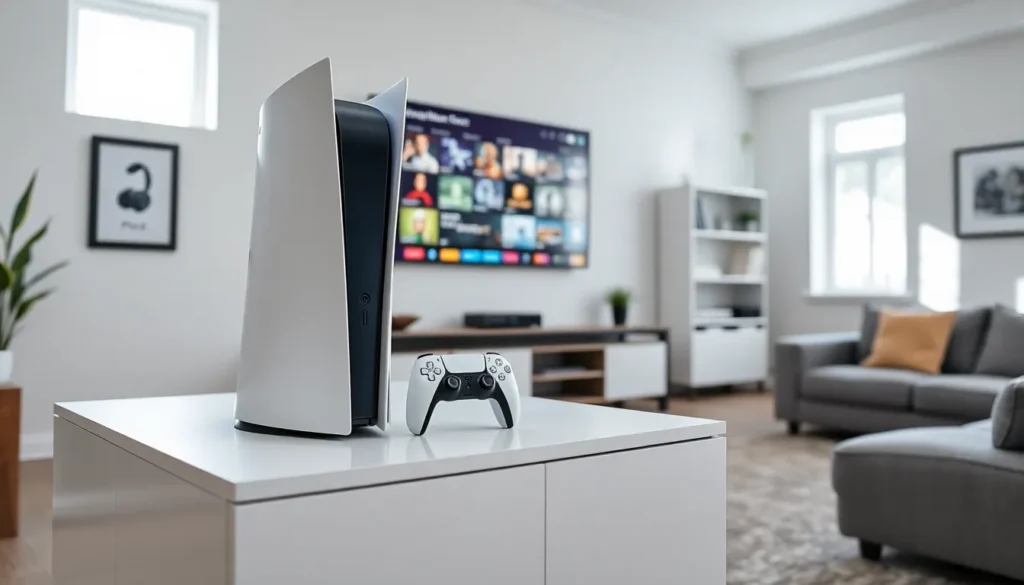
Sony currently sells two main PlayStation consoles: the PS5 Standard Edition and the PS5 Digital Edition. The Standard Edition includes a disc drive and costs more upfront. The Digital Edition lacks a disc drive but saves buyers about $100.
For most gamers, the Standard Edition offers more flexibility. It plays physical game discs, Blu-ray movies, and DVDs. Collectors who prefer physical media should choose this version. The Digital Edition works well for players who buy games exclusively through the PlayStation Store.
Budget plays a big role in this decision. Digital games often go on sale, but physical games can be resold or borrowed from friends. Someone who trades games frequently will benefit from the disc drive.
The PS4 remains available at lower price points. It can’t match the PS5’s speed or graphics, but it still runs thousands of games. Budget-conscious buyers might consider a PS4 as an entry point to PlayStation gaming. But, most new releases now target the PS5, making it the better long-term investment.
Storage capacity matters too. The PS5 comes with an 825GB SSD, though only about 667GB is available for games. Heavy gamers should plan to add external storage or an internal M.2 SSD expansion.
Setting Up Your PlayStation for the First Time
Setting up a PlayStation takes about 15 to 30 minutes. Users should gather the console, power cable, HDMI cable, and DualSense controller before starting.
First, connect the HDMI cable to the TV and console. Plug in the power cable and press the power button. The console will display setup instructions on the TV screen.
The system asks users to connect a controller via USB cable. After pressing the PlayStation button, the controller pairs automatically. Next, users select their language, connect to Wi-Fi, and accept the terms of service.
Creating a PlayStation Network (PSN) account is essential. This free account enables online features, game purchases, and cloud saves. Users can create a new account or sign in with an existing one. Choosing a memorable username matters, it’s visible to other players online.
The console will likely need a system software update during setup. This download can take several minutes depending on internet speed. Don’t skip this step: updates fix bugs and add new features.
After initial setup, users can customize their profile, set parental controls, and adjust privacy settings. Parents should explore the family management options to control what children can access.
Navigating the PlayStation Interface
The PlayStation 5 interface uses a simple horizontal layout. Games and apps appear as large tiles across the screen. The most recently used items show up first.
The Control Center provides quick access to common functions. Users press the PlayStation button once to open it. From here, they can check notifications, manage downloads, adjust audio settings, and switch between apps without returning to the home screen.
The Game Base feature connects players with friends. It shows who’s online, enables party chat, and displays recent messages. Pressing the PlayStation button and selecting the group icon opens Game Base instantly.
The PlayStation Store lives on the home screen. Users browse and purchase games, add-ons, and subscriptions here. The search function helps find specific titles quickly.
Media apps like Netflix, YouTube, and Spotify have their own section. Users can download these free apps from the media tab. The console switches smoothly between gaming and entertainment.
The Settings menu contains all system options. Users access it by selecting the gear icon in the top right corner. This menu controls everything from display output to account management.
Learning a few shortcuts speeds up daily use. Holding the PlayStation button opens the quick menu for power options. Double-pressing switches between the two most recent apps.
Essential Features and Settings
PlayStation Plus is Sony’s subscription service. It comes in three tiers: Essential, Extra, and Premium. Essential provides online multiplayer access and monthly free games. Extra adds a catalog of hundreds of downloadable games. Premium includes classic games and cloud streaming.
Cloud saves protect game progress. PlayStation Plus subscribers can upload saves to Sony’s servers. If something happens to the console, users can download their saves to a new system.
Rest Mode keeps the console in a low-power state while charging controllers and downloading updates. Users can enable Rest Mode in Settings > System > Power Saving. The console uses much less energy than full-on mode.
The DualSense controller offers unique features. Adaptive triggers create resistance during gameplay, while haptic feedback delivers precise vibrations. Games use these features differently, racing games simulate brake pressure, and action games add impact to combat.
Screen capture works with a single button press. The Create button on the controller takes screenshots or records video clips. Users can adjust capture settings to save longer videos or higher-quality images.
Parental controls help families manage gaming. Adults can set playtime limits, restrict mature content, and control spending. These settings apply per child account within the family group.
Activity Cards appear when users press the PlayStation button during a game. They show objectives, guides, and estimated completion times for different game sections.
Building Your Game Library
New PlayStation owners have several ways to build their game collection. The PlayStation Store offers digital purchases with frequent sales. Users should add games to their wishlist and wait for price drops.
PlayStation Plus Extra and Premium subscribers access hundreds of games through the service. This library includes major titles from Sony’s first-party studios and third-party publishers. Subscribers save money compared to buying each game individually.
Physical games often cost less than digital versions at retail stores. Used game shops sell older titles at significant discounts. The Standard Edition console makes this option possible.
Free-to-play games require no purchase or subscription. Titles like Fortnite, Apex Legends, and Genshin Impact offer full experiences without upfront cost. These games make money through optional in-game purchases.
PS4 games work on the PS5 through backward compatibility. Users can play their existing PlayStation 4 library on the new console. Many older games run better on PS5 with improved frame rates and faster loading.
Sony’s first-party exclusives showcase the console’s strengths. Games like Spider-Man 2, God of War Ragnarok, and Horizon Forbidden West demonstrate what PlayStation hardware can do. These titles push graphics and use the DualSense controller’s unique features.
Reviews help users make informed purchases. Sites like Metacritic aggregate critic scores, while user reviews on the PlayStation Store show player opinions. Checking both sources prevents disappointing purchases.